Your credit limit has been reset to 0$ as the invoice(s) have crossed their due dates .You can voucher the booking using credit card .To reinstate your credit limit kindly
- TBO Wallet
Go To Booking
TBOHolidays
FAQ's
- Hotel Search Screen
- Hotel Search Results Screen
- Guest Details Page
- Review Booking Screen
- Confirmation / Voucher Booking Screen
- Queues
- Edit Profile
- Payment
- Registration
- Systems

Hotel Search Screen
- How do I make search for a destination?
-
Hotel Search is key module in the system which is connected to multiple hotel suppliers to provide the best option for any destination globally. In the hotel search screen the user needs to select the destination, the check-in and check-out date, number of rooms, number of passenger per room and click on the search button. The user can also mention the hotel name and star category to make the search narrow and more relevant to his/her requirement. For agents the search will be made on all active sources/hotel supplier exist in the system.
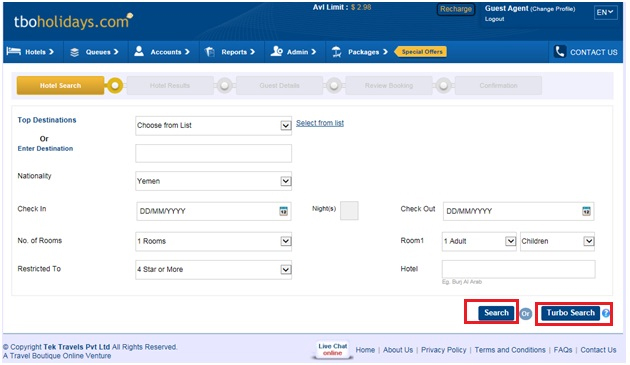
- Search Result: User has to click the "Search Result" button in order to make a defined search for the fields captured by him/her. Search results can be obtained by selecting Category of hotels through the "Restricted To" data element. As well as the search can be made only for a specific Hotels also.
- Turbo Search: User has option to use Turbo Search, that will give result in fasten mode however there is no difference in feed and its rate in both search option.
- Select From List: The dropdown list of the city contains a predefined list of top destination. A specific destination can be found from "select from list" link. This will open a popup to select the country and for the same country it will bring the entire available destination alphabetically.
- Edit Profile: This link is available to only Agents. Following elements are there under this page:
- Mark-Up: Agent can add his own mark up on the existing base price by using this functionality. The mark up can be added only in percentage. Its changes are reflected in each & every page. The customer invoice will get generated with hotel price inclusive of markup however the agent invoice will get generated without mark up.
- Search: The page Change Profile page provides the agent the option to choose a preferred currency. Procedure is explained as under after choosing preferred currency; agent needs to click on "Save Changes" button to commit the changes.
- Notification: If any agent has provided his own logo during registration, then it will get reflected over hotel voucher by clicking this check box.
- How do I search directly with a hotel name?
- Follow the steps
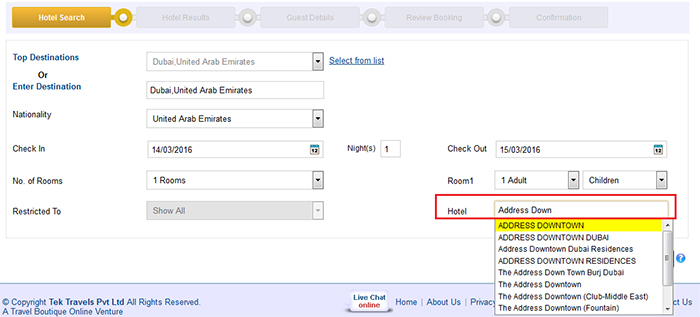
- Enter the destination
- Enter check in & check out date
- No of rooms
- Capture Hotel Name eg. Taj
- Click on "Search" button
- What is the use of preferred hotels option?
- Preferred hotels provide an option to user to select from most frequently visited options in the dropdown for a specific destination.
- What if the destinations don’t appear in the auto complete?
- Follow the steps
- User can opt for the "Select from list" option.
- Click on the "Select from list" link.
- Select the country from the list
- Select the desired city from the list
Hotel Search Results Screen
- How can I view the hotel details?
-
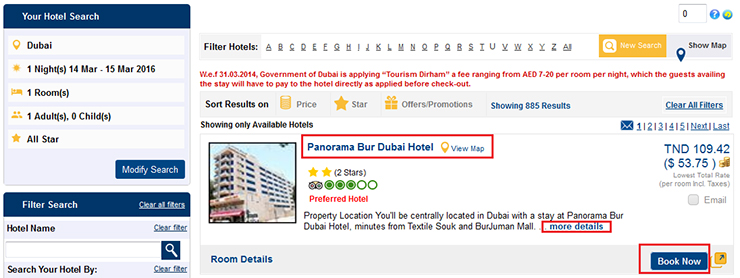
User should click on the "More Details" link provided on the individual hotel results. After clicking that link, user will be able to view the hotel description, Photos & Amenities.
User can click on ‘Hotel name’ as highlighted in screen shot OR can click on ‘Book Now’ button and can see the hotel detail from all these options.
- Where will I search for hotel policies (Cancellation details)
- User should mouse over on "cancellation policy" information given in tab along with available Room detail in order to view the required hotel policy.

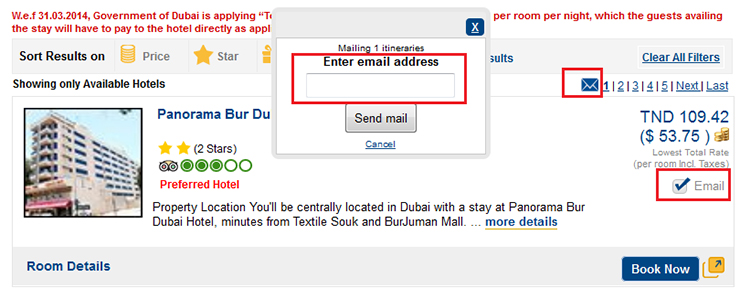
- What if, I have to mail the details of hotel to an email ID?
-
User first of all needs to select the hotel for which the details have to be send. Multiple selections can be made through check boxes. After selecting the required hotels, user should click on "Email selected hotels" link. Enter the email id & send it.
- How I can make use of the filters?
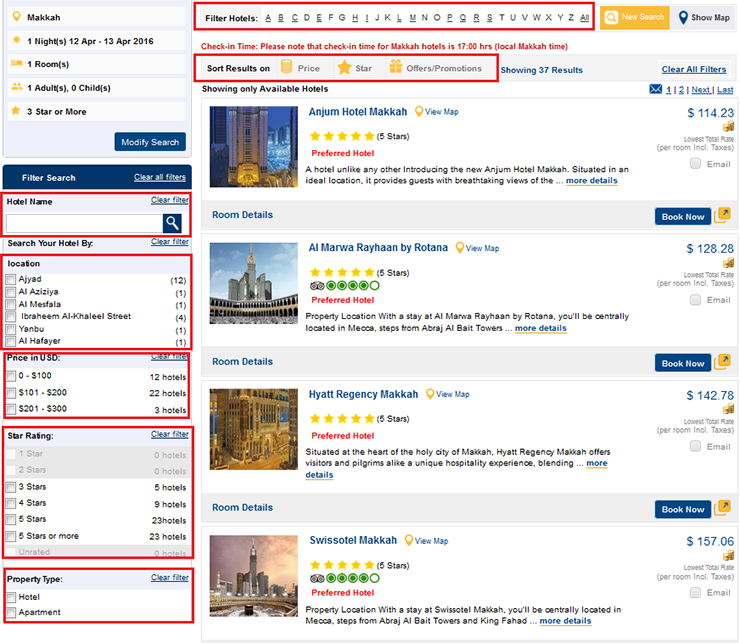
- Following are the filters which are provided for the convenience of a user:
- Hotel Name: By typing in the required hotel name
- Location: By selecting the required location of property.
- Price in USD: By checking out the check box of the required price slab
- Star Rating: By making selection for the star rating (1, 2, 3, 4 & 5 Star)
- Property Type: By selecting the required property type
- Sort (price): High to Low / Low to High
- Sort Star Rating: 0 to 5 or 5 to 0
- Offers/Promotions: Promotions on top or default view.
- Alphabetical: Hotel Name through the alphabetical selection.
- How to make use of small text box above hotel results?
-
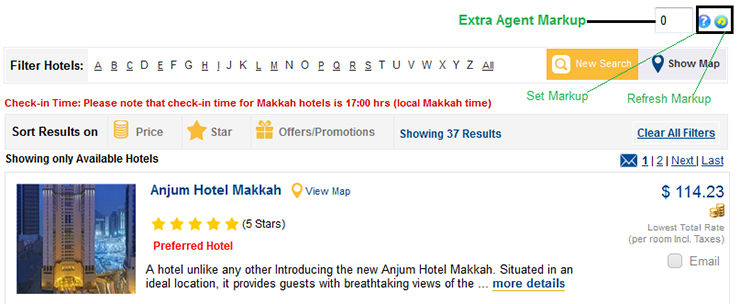
This small text box basically sets extra agent mark up that facilitates incremented mark- up value that gets implemented with just a click.
Guest Details Page
- How exactly the guest details page is linked with Amadeus selling platform?
-
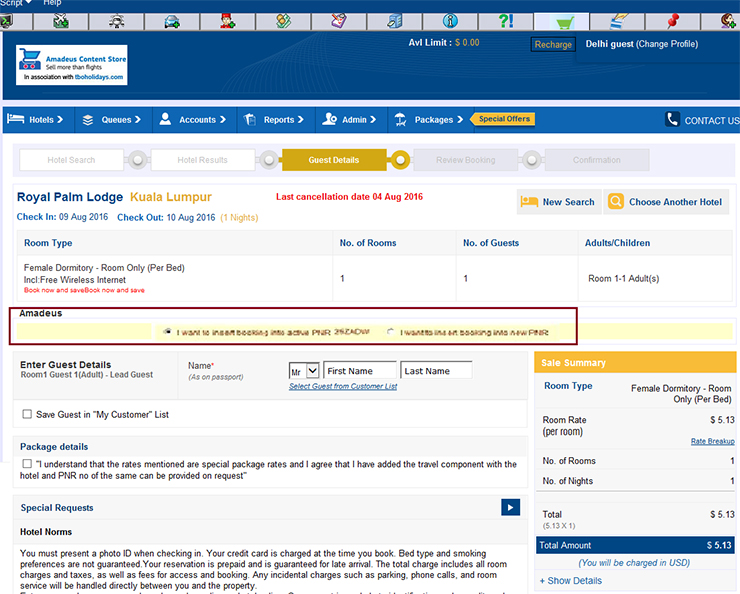
- When the user lands on the passenger details page, automatically PNR in the active session will appear in the dropdown.
- The user selects the active PNR , the corresponding passenger name drop down should show with the lead passenger name. It gets automatically filled up in the passenger details part.
- What will happen, if there is no pnr available in active work area?
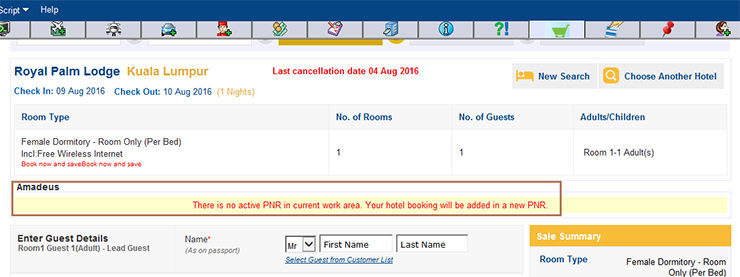
- A message will get displayed to the user: "There is no active PNR in current work area. Your hotel booking will be added in a new PNR". After confirmation the booking details will be added in the new ghost PNR
- Will the guest details get auto-filled once the lead guest gets selected?
- After selecting the lead pax name from the dropdown, the passenger name fields get auto filled.
- How I can save my frequent customer list?
- After fill the guest name, you need to check the given check box named ‘Save Guest in “My Customer” List’.

Review Booking Screen
- What is the purpose of the screen?
-
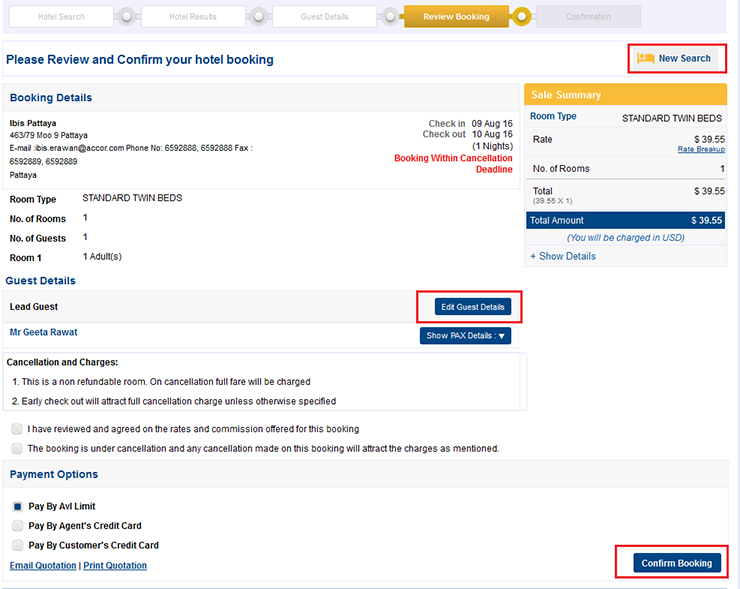 On this screen, user will be able to review all the hotel details for which he is going to book like hotel name, city, address, price etc. If at this stage he wants to change the passenger details or hotel then he has an option to go back by using Edit guest details link" & "New Search" link.
Confirmation Screen / Voucher Booking Screen
- How I will identify my booking has been confirmed or not?
-
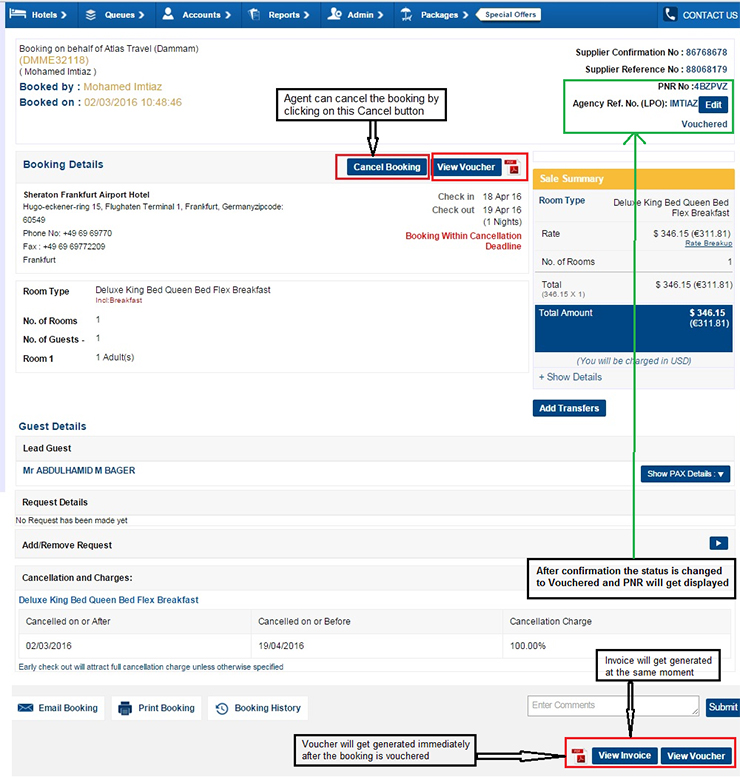 After user confirms the booking on the review booking screen, he will land on the confirmation / voucher screen in which PNR No & confirmation No will be shown to the user along with the Voucher & Invoice.
 - How I will generate voucher?
-
"Generate Voucher" link is provided on the Hotel Confirmation page, in order to generate Voucher.
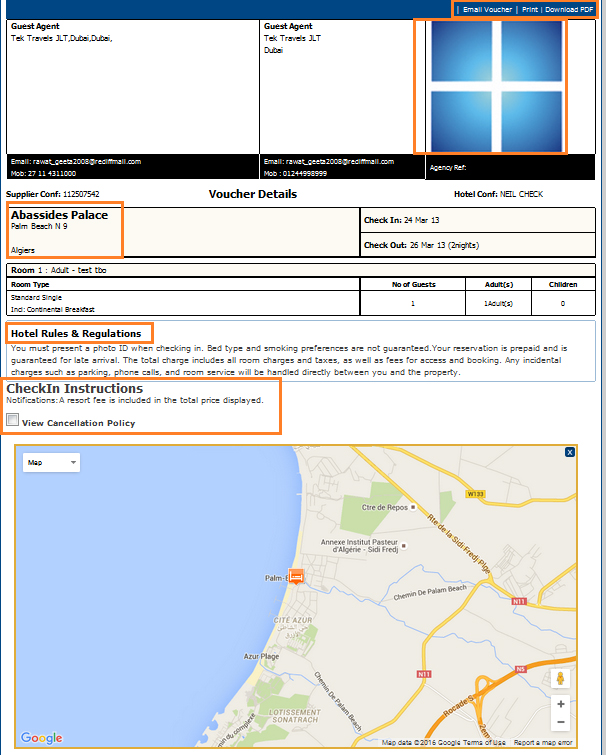
 This document is handed over to the end customer to check-in to the hotel. The user can print or email this voucher based on the need. It contains the name & address of hotel, hotel booking ID, reference number, cancellation policy, hotel norms & hotel map. This voucher describes about the itinerary chosen by the customer.
- How I will generate Invoice?
-
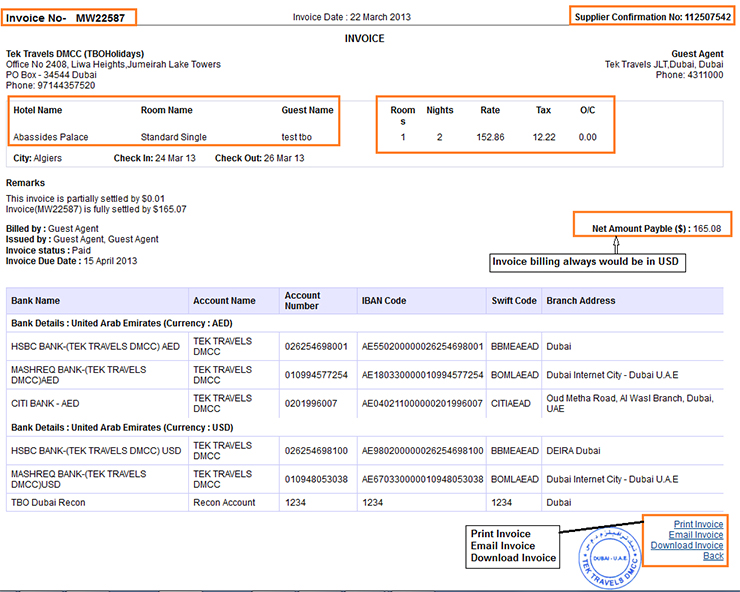
When the user clicks on "View Invoice" button, the Agent invoice will get generated. It is a receipt to an Agent for the amount charged for hotel booking. The Invoice contains elements like Invoice number, Confirmation number, Hotel Name, Room Type, Pax Name, Rooms, and Nights & Rate. It shows the total amount charged by the TBOHolidays for hotel booking in USD. It is billed by the TBOHolidays only. If users wishes to take print/download or mail the invoice then, those option are available under the Invoice.
Queues
- What is the relevance of Queues for agents?
-
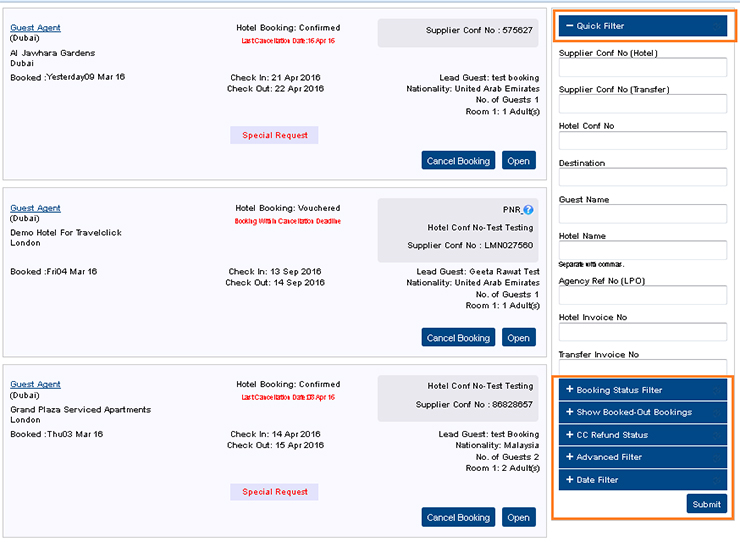 It consists of all the bookings made by an agent with their status as "Confirmed", "Vouchered" & "Cancelled". Default all the bookings are sorted with respect to the booking date.
- How will I search a booking in the queue?
- On extreme right side of the page, we have filter which is used to search for bookings. Bookings can be searched with the options through Status, Suppliers, Destinations, Hotel, Agents, and Confirmation No & PNR No, Date, CC refund status and Booked-out status.
- How I will cancel a booking using "Cancel Booking" Button?
-
Through "Cancel Booking" Button user can cancel the booking. Follow the required steps:
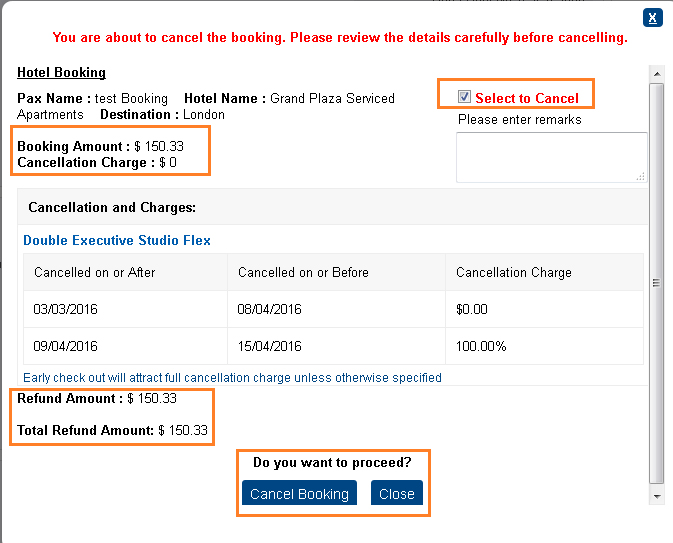
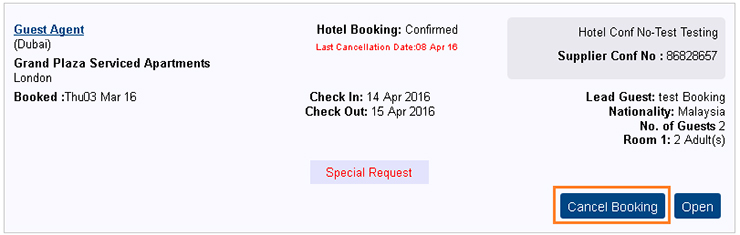 Once user clicks on Cancel Button, popup appears to show and confirm the detail of booking, cancellation charges and refund amount
- Click on the "Cancel Booking" Button
- If any relevant information has to be passed then, user can write in the text box provided there itself.
- User should click on "Cancel booking" button in order to raise a request for Cancellation of the booking.
- After this procedure, the booking will be cancelled.
Accounts
- How I will be able to update my payments in the system?
-
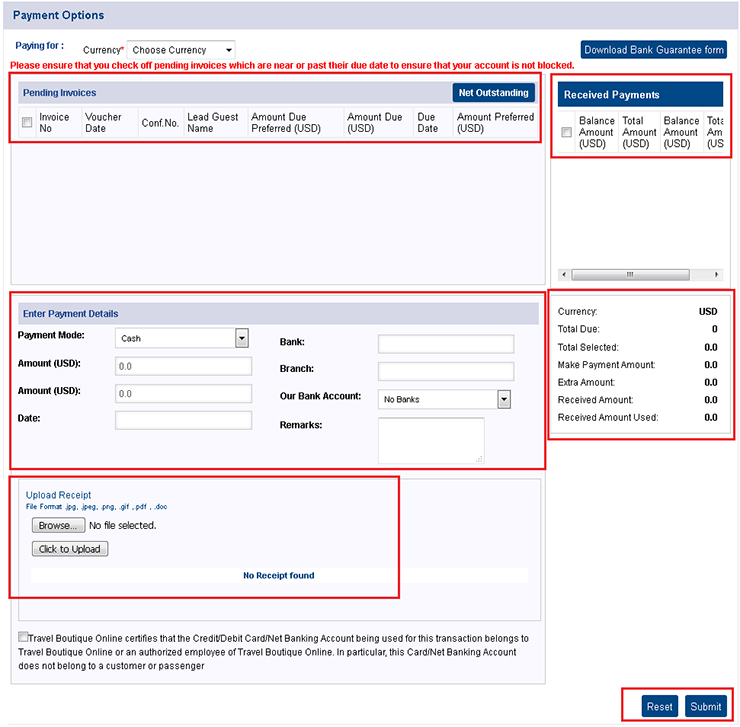 By using following steps, user can update payments details in the system:
- Agent has to make payment request through this page.
- Agent can view all unpaid invoices and received payments here.
- Agent should enter all the required payment details under this page.
- Payment modes are: Bank transfer, cheque, cash and credit card.
- User has to press "Submit" button in order to submit the payment details to the Admin.
- Once the payment has been submitted by an Agent, then a message shall appear at the top of the page "Payment has been submitted".
- Request will drop into the Admin queue. Admin will process the request & update the payment in the agent’s account.
- What is the relevance of "Invoice History" page?
-
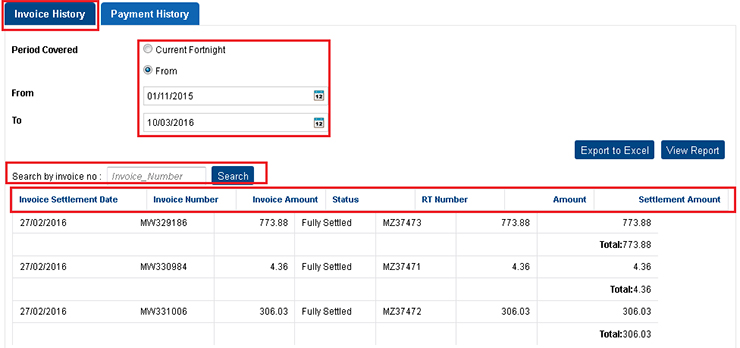
Invoice History - This page shows all the invoices with their respective status (fully settled/raised) for the booking transaction happened. The details of all invoices are show with Invoice No, Invoice settlement Date, Invoice Amount, RT number, Amount & Settlement Amount.
User can view specific invoice detail using option "search by invoice no:"
User can select from the "current fortnight" or "choose another period" option to view all the invoices within that period.
- What is the relevance for "Payment History" page?
-
Payment History - This page shows the list of all payment made by an Agent through the portal. The detail of the payment consists of RT number, settled invoices, Invoice amount, Status, Settlement amount & uploaded receipts (if any).
User can view specific Payment detail using option "search by payment no:"
User has to select the period according to his/her wish & press "view report" button in order to view all the list of payment made by him under that period.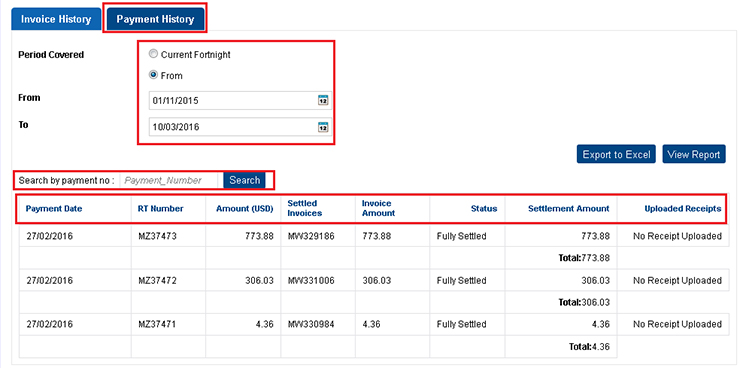
- How I would be able to view my accounts?
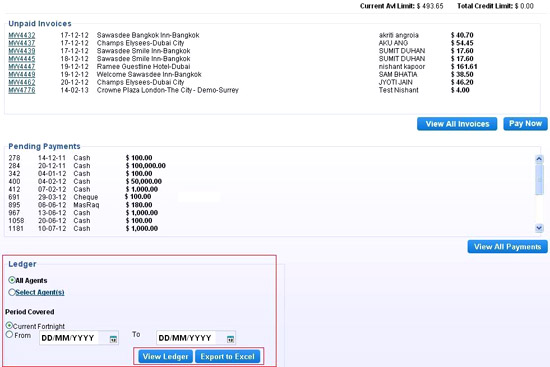
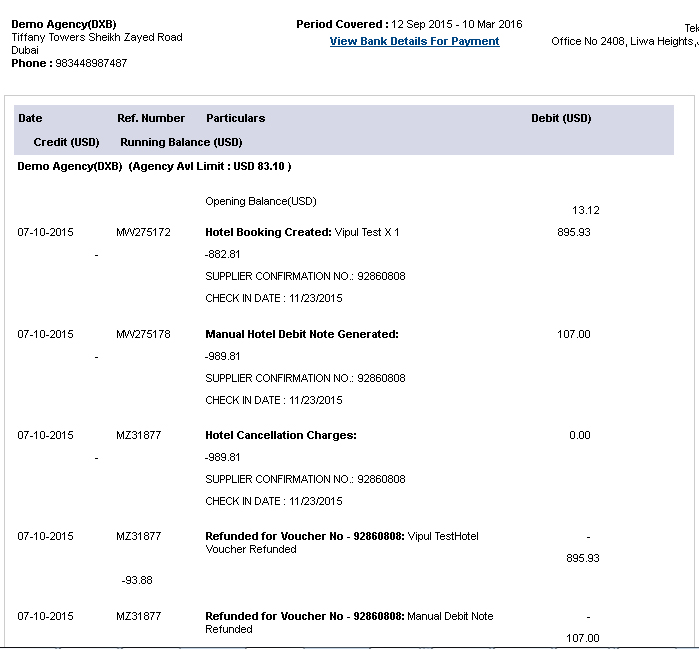
- There is a link "View Accounts" under Accounts tab, which will guide the user to its own ledger. Following are the features of the Accounts:
- This page shows the general ledger for all the transactions made through the portal. It consists of all the general ledger entries for books & cancellation transactions.
- Total Credit Limit is shown on the extreme top left corner for an Agent, which is provided at the time of the registration
- Current available Limit for an Agent is also shown on the page itself that vary depending upon the debit & credit made through his account depending upon the bookings & payments made by him.
- User can select the period for which he wishes to see the ledger & subsequently export it to Excel also by clicking on "Export to Excel" button. In case user wants to see on the page itself then he has to press "View Ledger" button.
- Pending payments are also shown on the screen itself, which shows that those payments are not yet approved.
- Unpaid invoices are also shown on this screen which is yet to be paid/settled.
- What are a credit note & its relevance?
- Features of credit note are as follows:
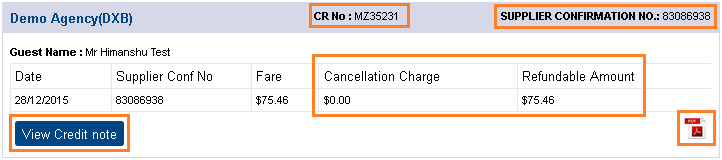
- For any cancellation transaction, the credit note is issued for the refund amount after deducting cancellation fee from it.
- User will see all the credit note. User has to click on "View Credit Note" button in order to view the respective credit note.
- Filter is provided in order to make a search for credit note by providing pax name & confirmation number.
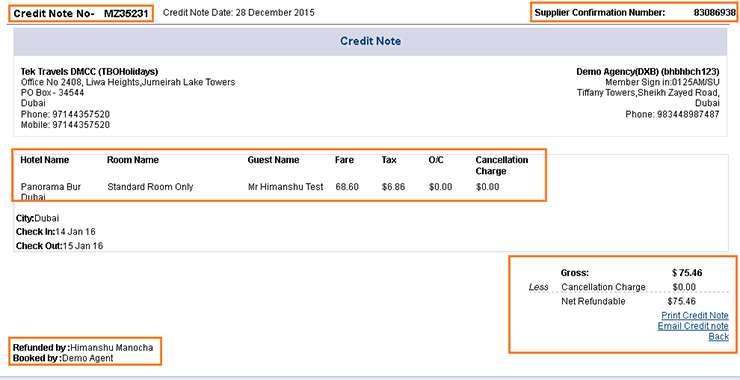
- On the top of it, Credit Note No, Credit Note Date & Confirmation number is displayed. These numbers are unique.
- Credit note contains details of the hotel itinerary like confirmation no, hotel name, room name, passenger name, fare, tax & cancellation charges.
- Net refundable amount is shown after deducting applicable cancellation charges from gross amount.
- "Print credit note "& "Email credit note" links are provided to the user in order to get print & email of credit note.
Edit Profile
- How do apply mark up?
-
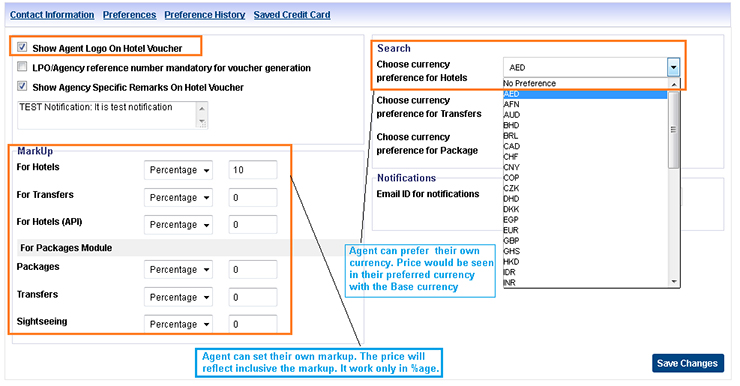 Once agent logs in to the portal, "Edit Profile" link appears at the top right hand corner of each page. Click the link. Agent can add his own mark up on the existing base price by using this functionality. The mark up can be added only in percentage. Its changes are reflected in each & every page however the invoice will get generated without mark up.
- How shall I include my preferred currency?
- Under the changes profile page, user has an option to select their preferred currency from the dropdown. After selection is made, user can view the rates in their preferred currency as well as in USD. After selecting the preferred currency, user should save the details.
- How agency’s branding can be made on voucher?
- If any agency has provided their logo during registration, then it will get reflected over hotel voucher by clicking the check box provided in the "Edit Profile" page.
Payments
- How I will make a payment?
- Follow the steps
- Once an offline payment has been accepted through Bank Guarantee / Floating Deposits, user through portal can update those payments.
- Under Account’s tab click on "Make Payment"
- User need to enter all mandatory payments details.
- Click on "Done" button
- Request made by agent will drop into the queue of the administrator. After verification of payment details, administrator accepts / rejects the payment.
- After the acceptance of the payment, agency’s cash accounts will get updated.
- What are the modes of the payment?
- There are four modes of making a payment.
- Bank Guarantee
- Floating deposits
- Credit Card
- Cheque
Registration
- How can I register?
- Steps for registration
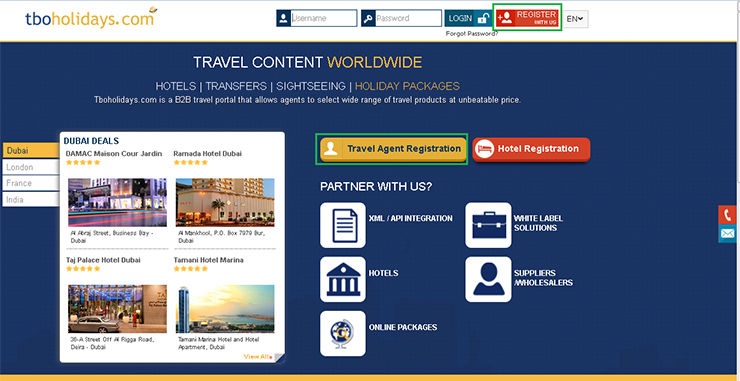
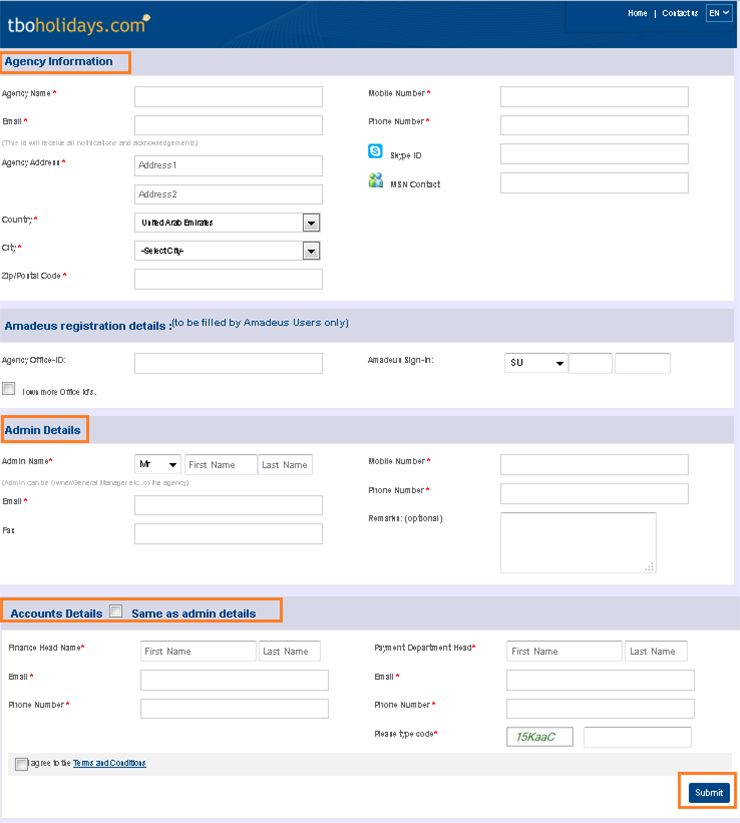
- Type url: www.tboholidays.com on your browser window
- Click on "Register is us" button on the home page
- Fill up all the mandatory details under registration form
- After capturing all the details, click on "Submit" button.
- All the details will get saved, & your request for registration will drop into the Tboh accounts staff queue.
- You will get an auto generated notification mail along with application number.
- Once the application is received, the Tboh staff will immediately get in contact with the agency.
- How login details will be communicated to us?
- Once the staff accepts the application from the agency, immediately the agency gets registered in our portal & subsequently the username & password will be communicated to them through email.
- Is there any kind of offline support provided to agents?
- Yes, we provide both technical as well as operations support to our travel agents. In case of any technical issue contact support@tboholidays.com and in case of non-technical/Operations queries ; agent can mail to ops@tboholidays.com or can directly contact to the Dubai office contact numbers. In case of any accounts related queries agent can mail to accounts@tboholidays.com
- What should I do, when my login gets failed?
- Follow the steps
- Either Username or Password or both are incorrectly typed.
- Even after typing correct username & password, if users are getting the same error then please contact: support@tboholidays.com or Dubai office contact no.
- How can I change my password?
- Step to change the password.
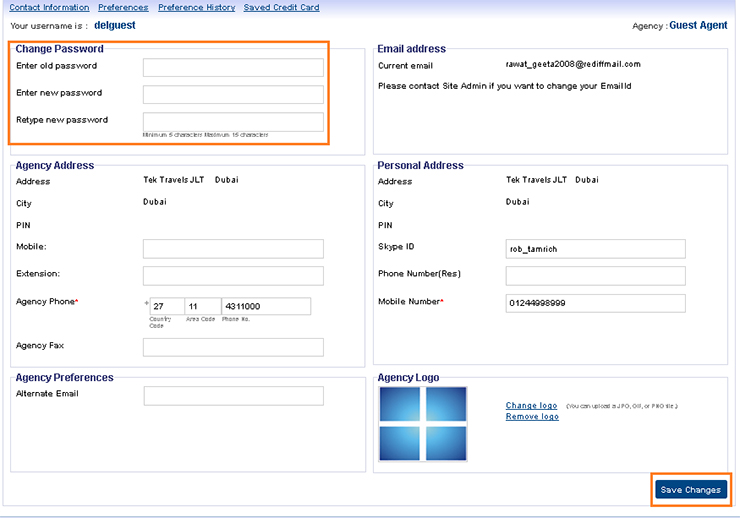
- Click on Edit Profile link given on the top.
- Open Contact information page.
- Enter old password and then new one what you want to change and click on “Save changes” button.
- What I do If I forget my password?
-
- On home page user need to click on "Forgot Password" link.
- User should type the email address on pop up window.
- After entering email address, click on "Get Password" button.
- A link will be send to the user’s email id.
- Click on the link, & user will be redirected to a page wherein he can reset his password.
Systems
- What is meant by the message "Session expired" ?
- "Session Expired" message will be shown if user spends more time on a single page. In order to avoid this message, please try not to spend too much time on a single page.
- What shall I do when this message appears "Unable to book Hotel?"
- After filling all the details required for a hotel booking, when clicks on the "Confirm" button then this message pops up. This message appears when the booking is not being made at the supplier end or when the supplier is unable to respond to the request. User can retry & make the booking for the same search criteria.
- What shall I do when this message appears "No hotels found?"
- This message can appear for the following reasons:
- When results are not provided from the suppliers end.
- When the city code is not mapped against the supplier.
- What shall I do when this message appears "Email not sent successfully"?
- Due to the technical issues, this type of error message crops up. In order to rectify it, kindly contact at: Users can contact at: support@tboholidays.com or contact Dubai office for offline handling of request.
- What is meant by the message "Server Too Busy"?
- Due to the technical issues with respect to the Internet connectivity, this type of error message crops up. In order to rectify it, user can repair their internet connection at their end. If still user is not bale to fix it, then kindly contact at: support@tboholidays.com or contact Dubai office for offline handling of request.
- What is meant by the message "No bookings found" under Queues?
- This message comes due to the reason when the user is using the filter incorrectly (wrong PNR / Confirmation No / check box) or there are no bookings made.
- Is there any kind of reports which provide details of bookings?
- Yes we do provide a comprehensive Hotel Sales report & Confirmation report which consists of all the bookings, cancellations & amendments made by an agent on day to day basis. The sales report can be accessed under Reports tab.
- Can I create my own users?
-
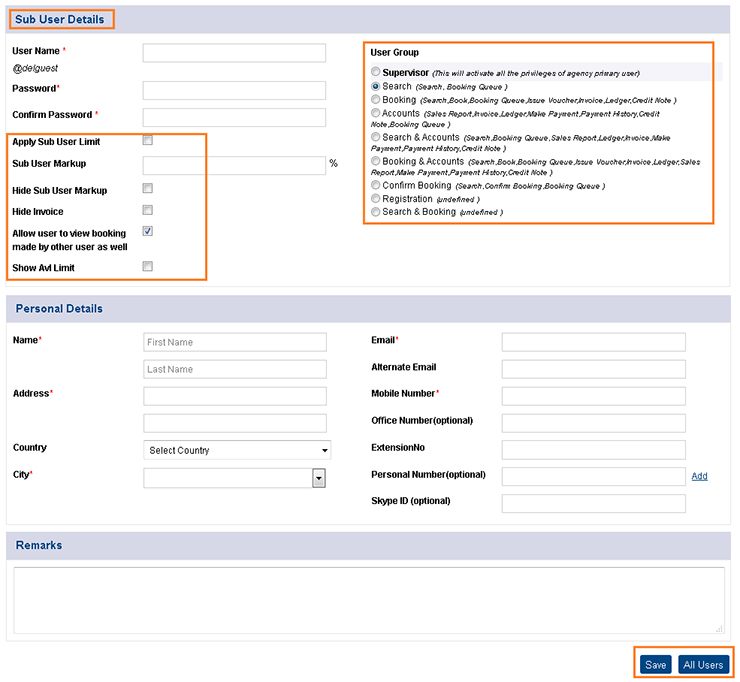
- Agent should click on "Create User" under Admin tab
- Fill up all the mandatory details under that page. An agency can provide different access to their user by selecting their role.
- Agency can restrict with Sub-user limit, view invoice, view available limit.
- Save the details
- Now the user can login with the credentials made by agency.
- Agent can view & edit its entire user by clicking on "All user" under Admin tab.
- How can I cancel or amend my bookings?
-
Cancellation / amendment of a booking are made offline. Agents first of all need to make a request for the same. Follow the steps
Cancellation:
- Click on "Bookings" under Queues tab
- Search the booking for which the cancellation request has to be made through filters.
- Click on the "Cancellation Request" link provided in the booking. Request change window will pop up.
- Click on "Send Request" button.
- This request will drop into the operations staff’s queue & they will process accordingly.
- After the Admin cancels the booking, the status of the booking will get changed to "Cancelled".
Amendment:
- Click on "Bookings" under Queues tab
- Search the booking for which the Amendment request has to be made through filters.
- Click on the "Amendment request” link provided in the booking. Request change window will pop up.
- Amend the detail and submit the remarks.
- Select the radio button so operation can get approval accordingly before process the Amendment and click on "Send Request" button.
- This request will drop into the operations staff’s queue & they will process accordingly.
- After the Admin amend the booking, the status of the booking will get changed to "Amended".
- What should I do when the system is not showing any results for a particular destination?
- This may be due to the loading of static data. In that case you can try one more time with the same search criteria. If still you getting same result then drop a query to: support@tboholidays.com or directly contact to Dubai Office
- How will I search my bookings into the queues?
- User can search the bookings by using filters provided on the right hand panel of the Queues page. User can make a search with following filters
- Confirmation number
- Hotel confirmation number
- Hotel Name
- Guest Name
- Hotel/Transfer Invoice number
- PNR No
- I have booked a room. What happens next?
- Once the room is booked following things will happen:
- Booking is stored in the Queues with Vouchered status.
- Agent cash balance will get deducted with the booking amount.
- Ledger will get updated with the booking amount.
- Sales report will get updated with the booking entered.
- Do I need to reconfirm hotel reservation with TBOHolidays?
- As such there is no need for reconfirmation regarding the reservation with TBOHolidays, once the booking is confirmed. The confirmation indicates that the booking is confirmed from the hotel suppliers.
- How do I know that the room I have booked is confirmed?
- Confirmation of booking is made on the review booking page. In that page user accepts the terms & policies & clicks on "Confirm" button. After doing so, the booking gets confirmed & screen will display the confirmation number as well as the PNR no.
Top ↑
© Copyright Tek Travels FZCO
A TBO Group Venture